¶ Plans & Specs
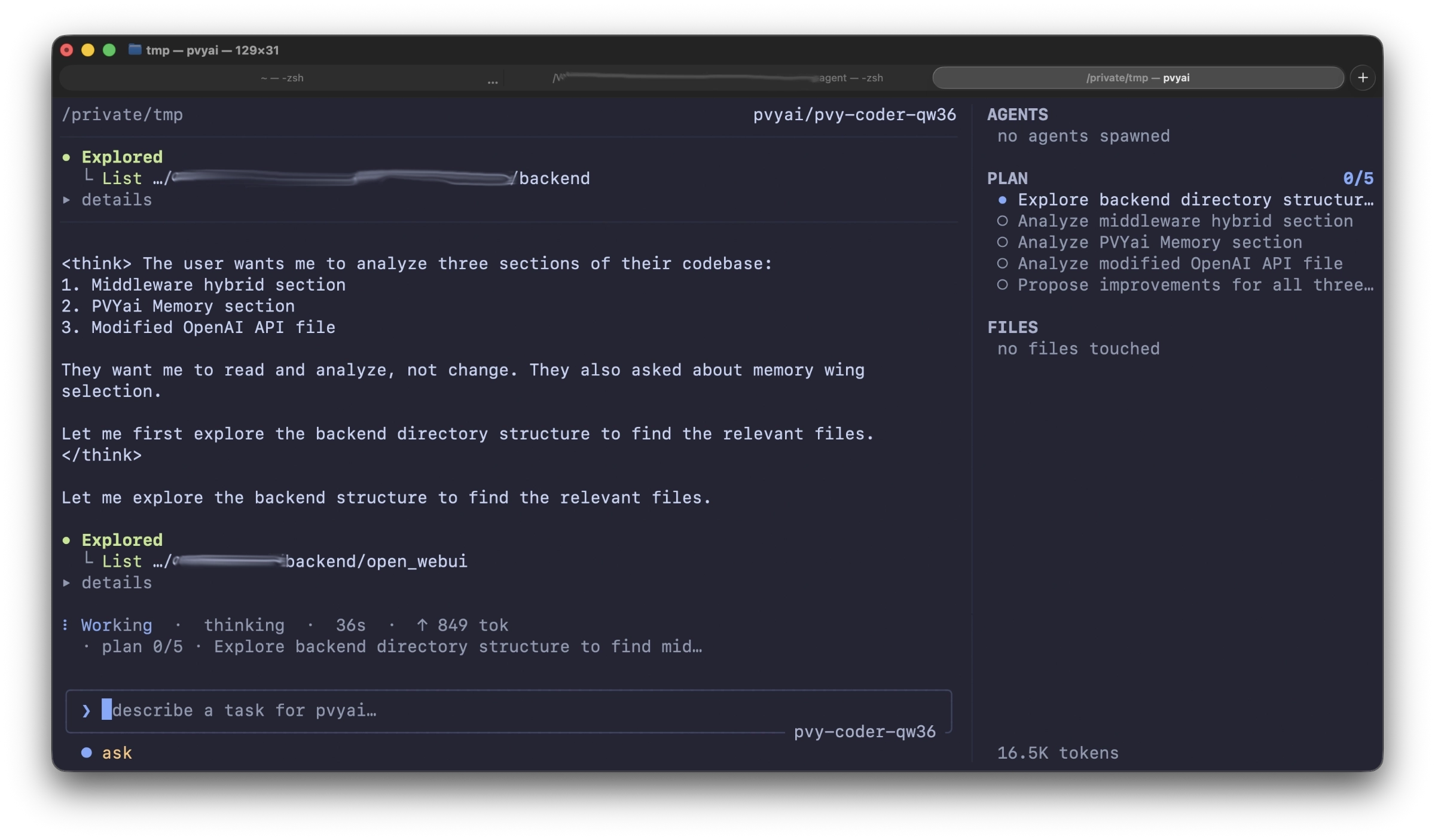
¶ PVYai Agent has two complementary planning systems:
- Live Plans (
update_plantool) — in-memory task tracking that the agent maintains autonomously during a run - Spec Mode (
/speccommand) — a persisted draft → review → implement workflow for structured, scope-controlled development
¶ Live Plans: The update_plan Tool
¶ What it is
The update_plan tool is a built-in tool the agent calls autonomously to create and maintain an ordered task list during a run. You don’t invoke it directly — the agent uses it to track its progress on multi-step tasks.
¶ How it works
- When the agent starts a multi-step task, it calls
update_planwith the full task list - As it progresses, it calls
update_planagain to mark items asin_progress,completed, orfailed - The plan is displayed as a sticky panel in the context sidebar (or as a pinned panel on narrow terminals)
- Each call replaces the entire plan (not a patch), so the agent always sends the complete list
¶ Plan item structure
{
  "id": "1",
  "content": "Add --version flag to main.go",
  "status": "completed",
  "notes": "Added flag.Parse() in main()"
}
| Field | Type | Values |
|---|---|---|
id |
string | Auto-numbered 1…N when omitted |
content |
string | Required — the task description |
status |
string | pending, in_progress, completed, failed |
notes |
string | Optional — details or results |
The status is flexible — the agent might write "done", "✓", "[x]", "wip", "doing", "skipped", etc. PVYai normalizes these to the four canonical values.
¶ Single in-progress rule
Only one item can be in_progress at a time. If the agent marks multiple items as in-progress, only the last one stays in-progress — earlier ones are auto-completed. This prevents a stale panel showing two simultaneous tasks.
¶ Guardrails
The agent loop enforces plan-keeping behavior:
| Rule | Threshold | Effect |
|---|---|---|
| Plan not called by turn 3 | 3 turns + ≥1 tool call | Inject a reminder to call update_plan |
| Stale plan (no update) | 10 tool calls OR 8 turns | Inject a “plan is stale” reminder |
| Run ends with pending items | Completion check | Nudge the agent to finish or mark items complete |
¶ Viewing the plan
| Action | Result |
|---|---|
/plan slash command |
Print the current plan as a text list in the transcript |
| Look at the sidebar | The PLAN section shows live progress with timestamps |
Ctrl+P |
Toggle the expanded/collapsed plan panel |
¶ Auto-completion
When a run finishes but the agent didn’t mark the last steps as done, PVYai force-completes them so the panel reads “PLAN COMPLETE” instead of getting stuck mid-progress.
¶ Context compaction survival
When the conversation context is compacted (see [[02-core-workflow|Core Workflow]] /compact), the most recent update_plan call is extracted and preserved verbatim in the compacted summary. The live plan survives context compression — the agent doesn’t lose track of where it was.
¶ Spec Mode: The /spec Command
¶ What it is
Spec mode is a structured development workflow that forces the agent to plan before acting:
- Draft phase: The agent inspects the codebase in read-only mode and writes a detailed spec
- Review phase: You review the spec, edit it, approve or reject it
- Implementation phase: A fresh agent run executes the approved spec
This is ideal for:
- Large refactors with clear scope boundaries
- Features that touch multiple files
- Tasks where you want to review the plan before any code changes
- Team workflows where a spec serves as documentation
¶ Starting a spec
# In the TUI:
/spec Add a health check endpoint to the API server

# From the CLI:
pvyai exec --spec "Add a health check endpoint to the API server"
¶ The draft phase
When you type /spec <task description>:
- PVYai creates a spec-draft session (a new session kind in the lineage)
- The agent receives a read-only-constrained system prompt: it can inspect the codebase but cannot write files or execute commands
- The agent explores the relevant files using
read_file,grep,glob,list_directory, andlsp_navigate - The agent writes the spec by calling the
submit_spectool
¶ The spec file format
Specs are saved as markdown files in .pvyai/specs/:
.pvyai/specs/2026-07-07-add-health-check-endpoint.md
The filename is <date>-<slug>.md where the slug is derived from the title (kebab-case, max 60 chars).
A typical spec file:
# Add Health Check Endpoint

## Goal
Add a GET /health endpoint that returns 200 OK when the server is healthy,
including database connectivity and cache availability checks.

## Relevant Files
- internal/server/routes.go (route registration)
- internal/server/handlers.go (handler functions)
- internal/db/conn.go (database ping)
- internal/cache/redis.go (cache ping)
- internal/server/handlers_test.go (new tests)

## Implementation Steps
1. Add `HealthHandler` struct in `internal/server/handlers.go`
2. Implement `checkDatabase()` — ping the DB with a 2s timeout
3. Implement `checkCache()` — ping Redis with a 1s timeout
4. Register `GET /health` route in `internal/server/routes.go`
5. Add unit tests for both healthy and unhealthy states
6. Add integration test with a mock DB and Redis

## Tests
- `go test ./internal/server/...` — unit + integration tests
- Manual: `curl http://localhost:8080/health` should return `{"status":"ok"}`
- Manual: stop Redis, verify response includes `"cache": "unhealthy"`

## Risks
- DB ping timeout might be too short for high-latency environments
- Redis connection might be flaky during deploys
- Need to ensure the health endpoint doesn't require auth

## Out of Scope
- Kubernetes liveness/readiness probe configuration
- Metrics endpoint (separate feature)
- Rate limiting on the health endpoint
¶ The review phase
After the agent submits the spec, the run stops and a review card appears:
┌─────────────────────────────────────────────────────────────┐
│  Spec Review: Add Health Check Endpoint                     │
│  File: .pvyai/specs/2026-07-07-add-health-check-endpoint.md │
│                                                             │
│  [a] approve    [r] reject    [e] edit file    [esc] cancel │
└─────────────────────────────────────────────────────────────┘
| Key | Action |
|---|---|
a |
Approve — load the spec and start the implementation phase |
r |
Reject — record the rejection (optional reason); you can /spec again |
e |
Edit — opens the spec file in $EDITOR for manual editing, then return to approve/reject |
Esc / c |
Cancel — clears the review UI; the spec file remains on disk |
¶ The implementation phase
When you approve a spec:
- PVYai loads the spec file from disk
- The spec body becomes the “approved source of truth for scope”
- A spec-impl session is created (linked to the draft session)
- A fresh agent run starts with full tool access (write, edit, execute)
- The agent follows the spec’s implementation steps, using
update_planto track progress
The implementation agent sees the spec as its primary directive. It should:
- Follow the implementation steps in order
- Stay within the “Out of Scope” boundaries
- Run the specified tests
- Report completion against the spec
¶ Session linkage
spec-draft session  ──approve──▶  spec-impl session
        │                              │
        └── rejected/retried            └── linked in lineage
Re-approving the same spec is idempotent — it reuses the existing implementation session rather than creating a duplicate.
¶ Spec-mode tool restrictions
During the draft phase, only these tools are available:
| Tool | Available | Why |
|---|---|---|
read_file, read_minified_file |
✓ | Inspect existing code |
list_directory, glob, grep |
✓ | Explore the codebase |
lsp_navigate |
✓ | Semantic code navigation |
ask_user |
✓ | Ask clarifying questions |
submit_spec |
✓ | Submit the draft |
write_file, edit_file, bash |
✗ | Read-only mode |
update_plan |
✗ | Hidden — no plan during drafting |
exec_command |
✗ | No execution during drafting |
¶ Managing spec files
# List all specs
ls .pvyai/specs/

# View a spec
cat .pvyai/specs/2026-07-07-add-health-check-endpoint.md

# Edit a spec before approving
$EDITOR .pvyai/specs/2026-07-07-add-health-check-endpoint.md

# Approve a spec from the CLI
pvyai spec show 2026-07-07-add-health-check-endpoint
pvyai spec approve 2026-07-07-add-health-check-endpoint

# Reject a spec from the CLI
pvyai spec reject 2026-07-07-add-health-check-endpoint --reason "Scope too broad"
¶ When to Use Which
| Scenario | Live Plan | Spec Mode |
|---|---|---|
| Quick multi-step task (add a flag, update README, add test) | ✓ | — |
| Large refactor touching 5+ files | — | ✓ |
| You want to review the plan before any code changes | — | ✓ |
| Team workflow with spec-as-documentation | — | ✓ |
| Exploratory coding with evolving scope | ✓ | — |
| Fixed-scope feature with clear acceptance criteria | — | ✓ |
| Pair-programming style (agent does, you watch) | ✓ | — |
| Compliance/review trail needed | — | ✓ |
¶ Best practice: Combine them
/spec "Implement feature X"— draft and approve a spec- The implementation agent uses
update_planto track its progress through the spec’s steps - You watch the plan panel fill in as the agent works
This gives you both the scope control of a spec and the live progress tracking of a plan.
¶ Next Steps
- Skills — Reusable instruction sets the agent loads on demand
- Specialists — Delegate focused tasks to sub-agent processes
- Team of Agents — Orchestrate multiple agents against a plan