¶ PVYvault Browser Extension
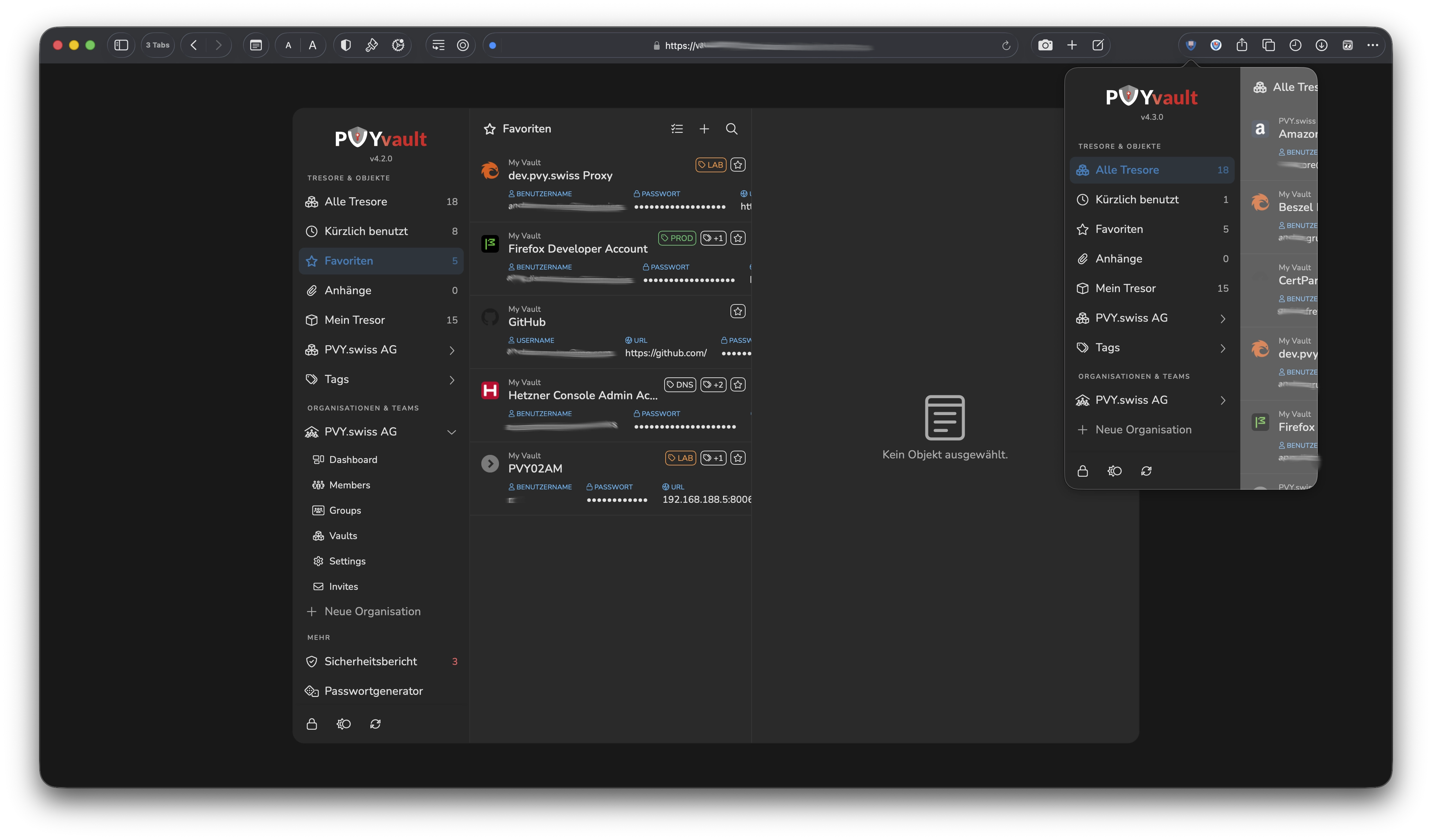
¶ ✨ SECURE. SMART. POWERFUL. INTUITIV
PVYvault Extension provides:
- ✅ DOM-based Extension Clickjacking Protection
- ✅ Instant visual feedback on every tab/URL change
- ✅ Privacy-conscious badge behavior when locked. Or disable.
- ✅ Professional UX that rivals commercial password managers
- ✅ Manifest V3 compliant with modern Chrome APIs
- ✅ Performance optimized with minimal overhead
A secure Browser Extension, with enterprise-grade functionality!
It runs your entire PVYvault and all its Core-Functionality as a Browser Extension, respect User Privacy, Security Concerns and leverage Security in your daily work.
¶ Availability
The Web Browser Extension of PVYvault is available for Apple Safari, Google Chrome (Manifest V3), Firefox (Manifest 3), Microsoft Edge and Orion Browser from Kagi.com.
It works also on other Derivate of the given Browser Frameworks, such as Brave (Chrome, Opera), Zen (Firefox) If you are an Apple, iOS or Linux User, we warmly recommend to Check Out the Orion Web Browser, with a strong focus on Privacy and User friendly Features who actually make sense.
¶ Security first
Many didn’t noticed, that most of the Password Manager out there are highly vulnerable and targeted on a daily base for Hijacking, as ethical Hackers reported already in August 2025:
https://marektoth.com/blog/dom-based-extension-clickjacking/
 PVYvault is not affected from this ClickJacking Method, since we do certain things differently.
For Example, we do not populate without any User Interaction any kind of sensitive Information into any Input Forms, as other Popular Password Manager does. (Auto-Prefill-Function)
¶ The smart difference
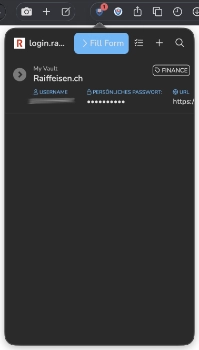
The Badge Icon indicates you, if you are in a “Unlocked State”, if you having matching Vault Entries for this particular Tab/URL/IP and leads you by Clicking to the Icon to the matched Entry in PVYvault. These View has an FillForm Button. A very intelligent one, which goes far beyond the usual “autocomplete” Variable which modern Websites or Applications offering. So it requires a manual interaction by an match from the User, and can’t be triggered remotely over ClickJacking to simulate a hidden “Login or Credit Card Filling Form”
Also locally in the Browser Storage, the Master Key entered from the User is only chached so long he is in the Unlocked Mode. If the Session Expires, the Masterkey is immediately voided. Every operation happens with Encryption. No Vault Items with Passwords are stored locally. This prevents also from potential Malware Infection.
¶ Features
¶ {{Placeholder-Video}}
¶ Security Features
¶ Auto-Lock
In your PVYvault Account Settings, Menu Security you can enable or disable the Auto-Lock Feature. There is a slider to set the Auto-Lock Feature from 1-10 Minutes. Once enabled, it will push PVYvault automatically during your existing Browser Actitivities, after the set time, into an Lock State when you reach the set iddle time, where you have to Unlock it again for use.
The Extension smartly resets the set Timeout itself each time you have an Browser Activitity. If you set your Auto-Lock Time to 5 Minutes, going to refill your coffee and contiinue to work 4 minutes 54 seconds later in your browser, the Extension stays unlocked.
¶ Extension Icon Badge Label
Please note, the PVYvault Browser Extenion Icon also sports an Badge. This Badge Indicator signalize you matching PVYvault Items from all your Vaults you have access to it, on any URL, Local or Public IP and for Developers even on localhost:3000 with an Red Count. This works only if the PVYvault Extension is in an "Unlocked "State.
In your PVYvault Account Settings, Menu Extension, you can disable this Indicator. By default its active, but paranoid Users may want to disable that.
¶ Offscreen
The PVYvault Extension leverage all Functionality offered by the Chrome Manifest Version 3 and its Secure API Calls. The architecture and its Tasks Management is delegated into 4 Core Components:
-
Popup and Icon
-
Background Service Worker
-
Offscreen Document and Offscreen Worker
-
LocalDB
These components leverage Security and Tasks, such as the Dedection over Listener for Tab/URl Changes as well to check matching Vault Entries in Unlocked State.
The Offscreen offers also an additional Layer of Security, if Auto-Lock is enabled: By switching away from the Web Browser into a different Application on your Computer, Auto-Lock of PVYvault Browser Extension is immediately activated.
The Extension has an encrypted and hashed Sync for PVYvault Server, like the App and can be used, if so long you are in an active Session / Unlock state, also without Internet on travel for Example. If you are using the Auto-Lock Feature and you have no Internet, you may want to use the PVYvault App for Desktop or Mobile, authenticate with your Fingerprint, Face-ID, Hello@ID or USB Key. Each time you are in a LockState, the Local Database voids and deletes your Key and resync next time you are Unlocked by entering your master key.
¶ Offscreen Security
-
✅ Offscreen document isolated
-
✅ No credentials exposed to background worker
-
✅ Only count (number) for Badge Indicator transmitted
-
✅ Master key never transmitted
¶ What you can’t do in the Extension
For Security Reasons you can not change in the Browser Extension following Settings and interactions:
-
Change your Auto-Lock Idle Timout
-
Export / Import Passwords
-
Change you Master Key
These Operations are only possible, when you logged to PVYvault in the Browser, Desktop or Smartphone App. But you can create new Vault Items, change Vault Items or reorganize it the way you want.
¶ Smart Functionalities & Full Application Control
¶ Behavioral Functionalities
¶ Web Browsing to a known Site/URL/IP Address
If you are in Unlocked State on the Extension (You unlock with your PVYvault MasterKey) the PVYvault Extension Icon signalize matching Vault Items with a red or blue Icon. Clicking this Icon immediately opens the matching Vault Item.
From there you can use either the Blue “FillForm”" Button to Populate your Secrets into a Login Form, or you can also copy them. You can also edit the item, to generate a new Password, Token or change an existing value or add a note or upload a document. Further you can navigate trough other Vaults, Search or create a new entry or change your setting, while remaining on this URL. If you close the Popup and re open (due distraction) it saves your previous State and let you continue exact on same path as you where before. When you reload your Tab/URL then it loads the matching Vault Entry again.
This is a big difference to other Solutions on the Market and a necessity, let’s say you are in a Cloud Console to Manage Infrastructure or Tokens new Deployments, you may want to add them directly into the PVYvault Extension without an automatically re-direct to the currently matching Vault Item.
¶ Web Browsing and Create a new Login
When you are on a URL you don’t have a login or credentials yet, you can click the icon and with the + Icon you can create a new Vault Entry and Chose its Tresor.
It takes over the URL or IP for this IP and for Username it shows you always your PVY-ID E-mail as first, followed by other Usernames you often used, which you sideway scroll and pick.
¶ Tab / URL State Changes
The PVYvault Browser dedects any change in Status, such as Tab Closing, Reloading and does what you expect from it.
¶ Port Recognition
A unique feature more, which makes any Developer or DevOps Guy happy. These Peoples operate often multiple Projects on a http://localhost with different Ports.
You can enable this feature in the Menu “Extension” in PVYvault / Settings and it will extend the differentiation of a given URL or IP Address and present matching Vault Items Port specific. So you can run:
-
localhost:80 with your Dashboard
-
localhost:8080 with your Ollama UI
-
localhost:3000 with your log trailing tool
Each of this Host can have an dedicated Vault Item and is being recognized by the Browser Extension. Of Course it works as well with LAN and Public IPs.
¶ Smart Routing
The Extension detects, if you have an Empty URL Field or if you are on Browser Settings in Chrome, Firefox to tweak your settings. In such a case, a Click to PVYvault Extension presents you the All My Vault Items View, where you can instantly search to open a desired Desitionation in a new Tab, like a Bookmark Manager, just with the difference, it will present you matching Vault Items instantly and let you securely login. Also with OTP, if enabled.
¶ Smart Navigation
Unlike other Solutions out there, PVYvault respects and recognize User Interaction.
If you are on a given Tab/URL and open PVYvault Extension, it will present you immediately the matching Vault Item for it.
If you decide now, to browse or search another Vault Item, and going to navigate withing the Extensions Menu, it let you do so. It doesn’t bounce back to the Matched Vault Item as others does. It’s resetting your navigation route after an Tab/URL reload.
¶ PVYvault Core Functionality
In Fact, you have the Full PVYvault Application available with all its Menus, Search and Management Function as in the Web App, Desktop App or Mobile App. You can manage, search add, change everything you like, as where in the App itself, from the Browser Extension.
¶ CLI Tool & API
Beside of the Browser Extension for PVYvault, there is also a CLI Tool and an API.
¶ Password Phrase Generator
Did you know, that the built-in Password Word Phrase Generator using the Standards from EFF Dice Generated Standards? https://www.eff.org/dice ?
A 4-word passphrase from 7,800 words = 7,800^4 = ~3.7 trillion combinations, which is even for Quantum Computer impossible to hack and brutfore.