Getting Started with PVYai Agent
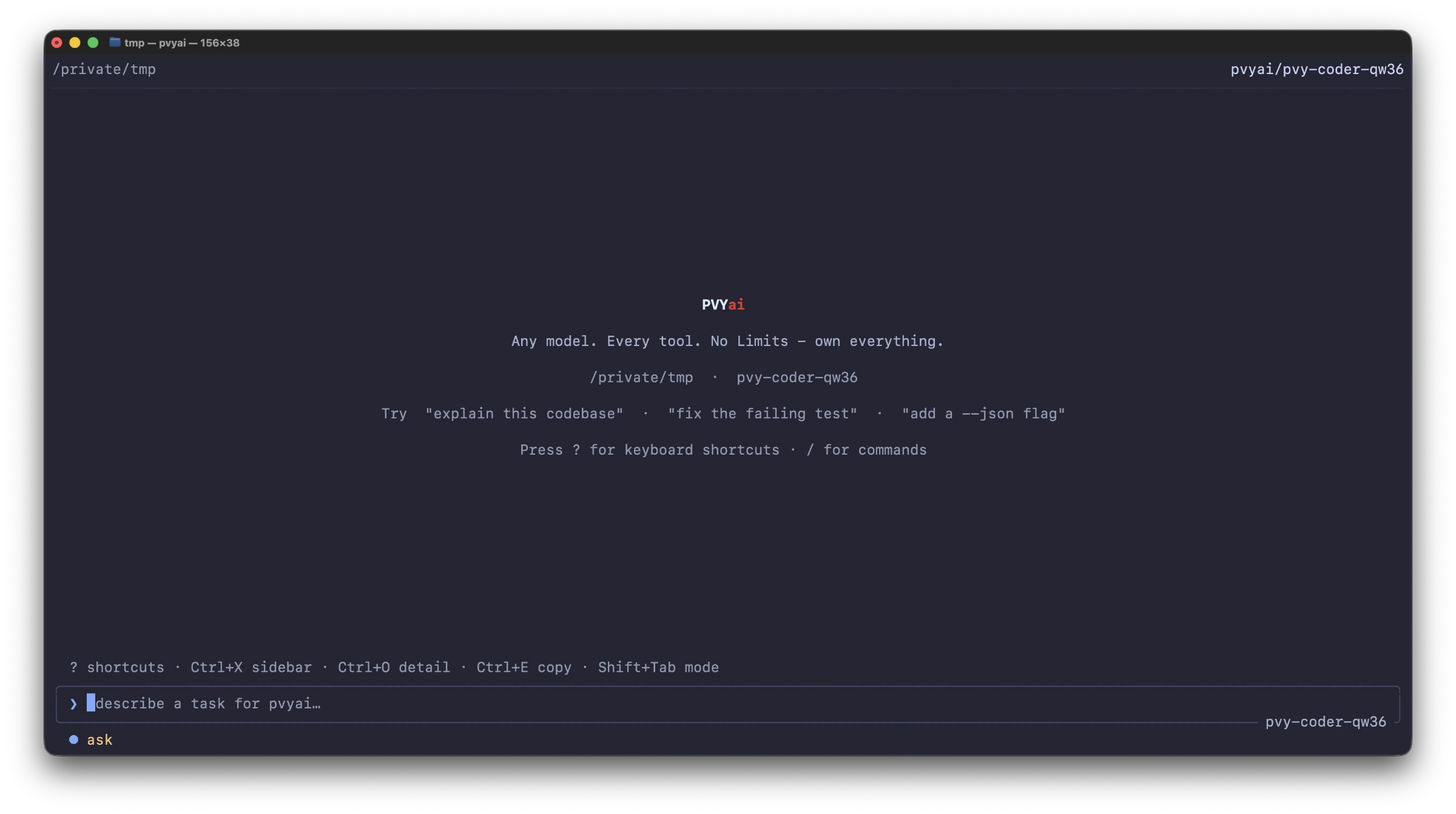
PVYai Agent is a terminal-based AI coding assistant — a Go binary that runs in your shell, reads and writes your codebase, executes commands, and manages multi-agent workflows. It supports 28+ model providers, OAuth login, skills, specialists, swarms, and plan-driven development.
Config note: The binary is
pvyai; config lives under~/.config/pvyai/and.pvyai/in your project.
¶ Installation
¶ Via npm (recommended)
npm install -g @pvyswiss/pvyai
This installs the pvyai binary and a Node.js wrapper that auto-downloads the platform-specific binary on first run.
pvyai --version
¶ As Developer with Multiple Node.js on System
As a Developer you have probably more than one Node.js on your System, and using NVE Manager to switch between them.
nvm install 24
nvm use 24
npm install -g @pvyswiss/pvyai-agent
If you are on macOS, you probably want to use brew
¶ Via direct download
Download the latest release from https://github.com/pvyswiss/pvyai-coding-agent/releases and place the binary on your PATH:
# macOS (Apple Silicon)
curl -L https://github.com/pvyswiss/pvyai-coding-agent/releases/latest/download/pvyai-v0.x.x-macos-arm64.tar.gz | tar xz
sudo mv pvyai /usr/local/bin/

# Linux x86_64
curl -L https://github.com/pvyswiss/pvyai-coding-agent/releases/latest/download/pvyai-v0.x.x-linux-x64.tar.gz | tar xz
sudo mv pvyai /usr/local/bin/
¶ Verify installation
pvyai --version
pvyai --help
¶ First-Run Setup
¶ Launch the interactive shell
cd your-project
pvyai
if you run a developer Version: ./pvai
On first launch with no provider configured, PVYai drops into the provider wizard — a guided setup flow that walks you through choosing a model provider.
¶ The Provider Wizard
The wizard has two entry paths:
| Method | Description | Providers |
|---|---|---|
| Sign in with OAuth | One-click browser login, no API key needed | OpenRouter, xAI, ChatGPT, Hugging Face |
| Paste an API key | Manual API key entry for any of 28+ providers | All providers |
¶ Quick start: PVY.ai Platform (recommended default)
PVY.ai Platform is the recommended provider — it’s the PVY Swiss sovereign AI endpoint.
Simply choose pre-selected PVYai Platform and paste your API Key. Done.
export PVYAI_API_KEY="your-api-key"
pvyai
The wizard detects the env var and skips credential entry. Your model defaults to qwen3.6:35b (Qwen 3.6 35B MoE, 110 tok/s on H200).
¶ Quick start: PVYai
Use the Setup Wizard, choose PVYai, Paste your PVYai API Key or if you prefer the Shell:
export PVYAI_API_KEY="YourPrivate_PVYai_sk-key"
pvyai setup pvyai --model qwen3.6:35b
pvyai
or:
export PVYAI_API_KEY="YourPrivate_PVYai_sk-key"
pvyai setup pvyai --model pvy-architect
pvyai
¶ Quick start: OpenAI
export OPENAI_API_KEY="sk-..."
pvyai
¶ Quick start: Anthropic
export ANTHROPIC_API_KEY="sk-ant-..."
pvyai
Please note: PVYai itself is offering all available Anthropic Models, through its Unified SSE API. Using Anthropic via PVYai let you benefit from:
- PVYai Sentinel
- PVYai Memory
- PVYai PriVacY
- PVYai MCP Tools with native Function Call
- PVYai Token Caching (Anthropic and PVYai Models)
¶ Quick start: OAuth (OpenRouter)
- Choose “Sign in with OAuth” in the wizard
- Select “OpenRouter or any other”
- Your browser opens to OpenRouter’s consent page
- Authorize → PVYai mints an API key automatically
- The key is stored securely (keyring on macOS, encrypted file on Linux)
We have oAuth prepared for PVY@Cloud Subscribers, which then will auto-provisioning it later automatically based on the PVY-ID. PVY@Office users have to configure the Endpoint by them self or ask support. ETA is early 2027.
¶ Headless / SSH setup (device-code flow)
If you’re on a headless server without a browser:
- Choose “Sign in with OAuth”
- Press
dto start the device-code flow - The TUI displays a URL and a user code
- On any device, visit the URL and enter the code
- PVYai polls until authorization completes
¶ Configuration
¶ Config file locations
| File | Scope | Path |
|---|---|---|
| User config | Personal, all projects | ~/.config/pvyai/config.json |
| Project config | Shared with team (checked into repo) | <project>/.pvyai/config.json |
Project config merges on top of user config. API keys are never stored in project config — they go to the encrypted credential store.
¶ Minimal config example
{
  "activeProvider": "pvyai",
  "providers": [
    {
      "name": "pvyai",
      "provider": "pvyai",
      "catalogID": "pvyai",
      "baseURL": "https://ai-api.pvy.swiss/api",
      "model": "qwen3.6:35b"
    }
  ],
  "maxTurns": 50
}
¶ Multi-provider config example
{
  "activeProvider": "pvyai",
  "providers": [
    {
      "name": "pvyai",
      "provider": "pvyai",
      "catalogID": "pvyai",
      "baseURL": "https://ai-api.pvy.swiss/api",
      "model": "qwen3.6:35b"
    },
    {
      "name": "anthropic-cloud",
      "provider": "anthropic",
      "catalogID": "anthropic",
      "model": "claude-sonnet-4.5"
    },
    {
      "name": "ollama-local",
      "provider": "ollama",
      "catalogID": "ollama",
      "baseURL": "http://192.168.188.30:11434/v1",
      "model": "qwen2.5-coder:32b"
    }
  ],
  "maxTurns": 50,
  "sandbox": {
    "mode": "enforce"
  },
  "notify": {
    "mode": "system"
  }
}
Note: For Ollama running on a remote host (not localhost), set the
baseURLexplicitly. The default Ollama descriptor useshttp://localhost:11434/v1— if you’re running the agent on your Mac but Ollama is on a server, the live model discovery will fail silently and the model picker will show nothing.
¶ Switching providers at runtime
# In the TUI:
/provider              # Opens the provider wizard
/model                 # Opens the model picker (shows models from all configured providers)
/model claude-sonnet-4.5   # Switch to a specific model (auto-resolves the provider)
/effort high           # Set reasoning effort
¶ Modes (presets)
PVYai supports built-in mode presets that bundle model + reasoning effort + turn limits:
| Mode | Model | Effort | Max Turns | Use case |
|---|---|---|---|---|
smart |
claude-sonnet-4.5 | medium | 50 (default) | General-purpose coding |
deep |
claude-opus-4.1 | high | 50 | Complex reasoning, architecture |
fast |
claude-haiku-4.5 | low | 15 | Quick edits, autocomplete |
large |
gemini-2.5-pro | medium | 50 | Long-context tasks (1M ctx) |
precise |
claude-sonnet-4.5 | high | 50 | Careful, thorough work |
# Use a mode
pvyai --mode deep "Refactor the authentication module"

# Or set it interactively
# Type: /model deep
¶ Environment Variables
¶ Provider selection
| Variable | Purpose | Example |
|---|---|---|
PVYAI_PROVIDER |
Active provider name | pvyai |
PVYAI_API_KEY |
PVY.ai Platform API key | pvyai-... |
OPENAI_API_KEY |
OpenAI API key | sk-... |
ANTHROPIC_API_KEY |
Anthropic API key | sk-ant-... |
GEMINI_API_KEY |
Google Gemini API key | AI... |
OPENROUTER_API_KEY |
OpenRouter API key | sk-or-... |
GROQ_API_KEY |
Groq API key | gsk_... |
DEEPSEEK_API_KEY |
DeepSeek API key | — |
OLLAMA_API_KEY |
Ollama Cloud API key | — |
¶ Agent behavior
| Variable | Purpose | Default |
|---|---|---|
PVYAI_MAX_TURNS |
Maximum agent turns per run | 50 (ceiling: 500) |
PVYAI_THEME |
Color theme name | dark |
PVYAI_REDUCED_MOTION |
Disable animations (accessibility) | unset |
PVYAI_NO_FADE |
Disable streaming text fade | unset |
PVYAI_STREAM_IDLE_TIMEOUT |
Stream idle watchdog timeout | 120s |
PVYAI_TOOL_OUTPUT_CEILING_TOKENS |
Max tokens per tool output | 30000 |
PVYAI_FORMAT_ON_WRITE |
Auto-format files on write | unset |
PVYAI_CHECKPOINTS |
Enable session checkpoints (on/off) |
on |
¶ Credential storage
| Variable | Purpose | Options |
|---|---|---|
PVYAI_CRED_STORAGE |
How API keys are stored | keyring (default), encrypted-file, plaintext |
PVYAI_OAUTH_STORAGE |
How OAuth tokens are stored | keyring, encrypted-file |
PVYAI_OAUTH_TOKENS_PATH |
Override OAuth token file location | — |
¶ Sandbox
| Variable | Purpose |
|---|---|
PVYAI_SANDBOXED |
Set to 1 when running inside the sandbox |
PVYAI_SANDBOX_BACKEND |
Sandbox backend (macos-seatbelt, linux-bwrap, windows-restricted-token) |
PVYAI_SANDBOX_NETWORK |
Network policy (deny, allow) |
PVYAI_SANDBOX_GRANTS_PATH |
Override sandbox grants file location |
¶ Web search
| Variable | Purpose |
|---|---|
PVYAI_WEBSEARCH_PROVIDER |
Search backend (searxng, tavily) |
PVYAI_WEBSEARCH_BASE_URL |
Search API base URL |
PVYAI_WEBSEARCH_API_KEY |
Search API key |
¶ MCP OAuth
| Variable | Purpose |
|---|---|
PVYAI_MCP_OAUTH_TOKENS_PATH |
Override MCP OAuth token file location |
PVYAI_MCP_PERMISSIONS_PATH |
Override MCP permissions file location |
¶ Directory Layout
~/.config/pvyai/
├── config.json              # User configuration
├── credentials              # Encrypted credential store
├── themes/                  # Custom theme files
├── specialists/             # User-level specialist definitions
│   ├── api-reviewer.md
│   └── test-writer.md
└── commands/                # User-level slash commands
    └── deploy.md

~/.local/share/pvyai/
├── skills/                  # Installed skills
│   ├── deploy-checks/
│   │   ├── SKILL.md
│   │   └── ...
│   └── skills.lock           # Skill provenance hashes
├── cron/                    # Cron job store
│   └── <job-id>/
│       ├── metadata.json
│       └── runs.jsonl
└── sessions/                # Session lineage store

<project>/.pvyai/
├── config.json              # Project-level config (shared with team)
├── specs/                   # Spec-mode drafts
│   └── 2026-07-07-add-review-flow.md
├── specialists/             # Project-level specialist definitions
│   └── db-migration.md
├── commands/                # Project-level slash commands
│   └── commit.md
├── swarm/                   # Swarm mailbox state
│   └── <team>/inboxes/
└── loop.md                  # Loop prompt for cron jobs
¶ CLI Overview
pvyai                                    # Interactive TUI shell (default)
pvyai exec "fix the bug in auth.go"      # One-shot prompt
pvyai exec --model claude-sonnet-4.5 "refactor auth"  # One-shot with specific model
pvyai exec --mode deep "design the API"  # One-shot with a mode preset
pvyai exec -w refactor-task "refactor X" # One-shot in an isolated git worktree
pvyai exec --file prompt.txt             # One-shot from a file

pvyai setup                               # Guided provider setup (same as TUI wizard)
pvyai auth                                # OAuth login management
pvyai auth login openrouter               # OAuth login for a specific provider
pvyai auth status                         # Show OAuth token status
pvyai auth logout openrouter              # Revoke OAuth token

pvyai providers                           # Inspect configured providers
pvyai providers check openai --connectivity  # Test provider connectivity
pvyai providers catalog                   # List all 28+ built-in providers

pvyai models                              # List model registry entries
pvyai doctor                              # Run health checks
pvyai context                             # Report context budget usage

pvyai skills list                         # List installed skills
pvyai skills add <git-url>               # Install a skill from git
pvyai skills info <name>                  # Show skill details

pvyai specialist list                     # List specialist definitions
pvyai specialist show <name>             # Show a specialist manifest
pvyai specialist create <name> --description "..." --prompt "..."  # Create

pvyai mcp list                            # List MCP server backends
pvyai mcp add <name> --url <url>          # Add an MCP server

pvyai cron add "0 9 * * *" --prompt "..."  # Schedule a recurring job
pvyai cron list                           # List scheduled jobs
pvyai cron run                            # Start the cron loop (foreground)

pvyai worktrees prepare --name refactor   # Create an isolated git worktree

pvyai eval --suite evals.json             # Validate an eval suite
pvyai eval run --suite evals.json --task <id> --workspace /tmp/ws  # Score a workspace
pvyai eval bench --suite evals.json --agent-command "pvyai exec --cwd {workspace} {prompt}"  # Full benchmark

pvyai search "authentication"            # Search persisted sessions
pvyai sessions                           # Inspect session lineage
pvyai version                            # Print version
pvyai update                             # Check for updates
¶ Matrix / PVYmessenger Notifications
PVYai supports webhook notifications via the PVYmessenger Web-hook bridge — a Slack-compatible webhook bridge for PVYmessenger. This is used by PVYmessenger via Channel Details, Bridges & Bots, add Web-hook, save and copy URL.
The bridge accepts a JSON POST with text, format ("plain" or "html"), displayName, avatarUrl, and msgtype fields. When format is "html", the text field supports minimal HTML (<b>, <i>, <br>, <a>, <code>, <pre>) rendered natively by Matrix.
¶ Setup
¶ 1. Set the webhook URL (env var — contains the bridge token)
export PVYAI_NOTIFY_WEBHOOK_URL="Paste the URL Here"
The URL contains the bridge token, so it stays in the environment — never in
config.json.
¶ 2. Optional: Set display name, avatar, and message type (env vars)
export PVYAI_NOTIFY_WEBHOOK_DISPLAY_NAME="PVYai Agent"
export PVYAI_NOTIFY_WEBHOOK_AVATAR_URL="https://ai.pvy.swiss/static/pvai-logo.png"
export PVYAI_NOTIFY_WEBHOOK_MSGTYPE="notice"    # "notice" (less intrusive) or "emote"
export PVYAI_NOTIFY_WEBHOOK_SUMMARY="pvyai-coder" # optional run summary
¶ 3. Optional: Configure HTML formatting (config.json)
{
  "notify": {
    "mode": "both",
    "focusMode": "unfocused",
    "webhook": {
      "format": "html",
      "displayName": "PVYai Agent",
      "msgtype": "notice"
    }
  }
}
The webhook URL is set via env var (contains the bridge token):
export PVYAI_NOTIFY_WEBHOOK_URL="https://our-endpoint.im/api/v1/matrix/hook/yoursuperlongtoken"
Environment variables take precedence over config.json values. The webhook URL is always from the environment (never from config.json).
¶ Example Matrix messages
Plain format (completion):
{
  "text": "PVYai: ready",
  "format": "plain",
  "displayName": "PVYai Agent",
  "type": "completion"
}
HTML format (completion with summary):
{
  "text": "<b>PVYai: ready</b><br><i>pvyai-coder</i>",
  "format": "html",
  "displayName": "PVYai Agent",
  "msgtype": "notice",
  "type": "completion",
  "summary": "pvyai-coder"
}
HTML format (awaiting input):
{
  "text": "<b>PVYai: needs input</b>",
  "format": "html",
  "displayName": "PVYai Agent",
  "msgtype": "notice",
  "type": "awaiting_input"
}
¶ Webhook env vars reference
| Variable | Purpose | Default |
|---|---|---|
PVYAI_NOTIFY_WEBHOOK_URL |
Webhook destination URL (required) | unset (disabled) |
PVYAI_NOTIFY_WEBHOOK_SUMMARY |
One-line run summary in payload | unset |
PVYAI_NOTIFY_WEBHOOK_FORMAT |
Text format: "plain" or "html" |
plain |
PVYAI_NOTIFY_WEBHOOK_DISPLAY_NAME |
Sender name shown in Matrix | unset |
PVYAI_NOTIFY_WEBHOOK_AVATAR_URL |
Sender avatar URL in Matrix | unset |
PVYAI_NOTIFY_WEBHOOK_MSGTYPE |
Matrix message type: "notice" or "emote" |
unset (normal) |
¶ Backward compatibility
The Slack incoming webhook users are unaffected — the new fields (format, displayName, avatarUrl, msgtype) are all omitempty and absent from the payload when unset. The text field remains the primary rendered content, exactly as before.
¶ PVYai Model Note (System Prompt/Personas/Identity)
Using the PVYai Agent, even its the same Unified SSE API, will exclude the Harness System Prompt, Personas / Identity entirely. You will get: PVYai Memory, PVYai Sentinel and all native function Calls to the 3000 Tools available in our Unified SSE API Stream, on top of the 46 default Tools every PVYai Agent has baked in.
Everything else is rough Model Power. You have to define your Roles/Personas/Identity local in the Project Folder where you let PVYai Agent running, for the single Agent as for Team Agents and its Speciallists (Sub-Agents, such as Explorer, Researcher, Validator).
¶ Default Tool List built in
Learn more about the Default Tools and MCP Server Connectors built in for local environments
¶ Next Steps
- Core Workflow & TUI Reference — Learn the keyboard shortcuts, slash commands, and permission system
- Plans & Specs — Plan-driven development with
update_planand/spec - Model selections & Providers — Deep dive into providers, the model picker, and the coding-model filter